 Dec 02, 2025 - 0
Minutes read
Dec 02, 2025 - 0
Minutes read
How to Use Semrush for Keyword Research:
Ultimate Guide for Success
If you want to boost your website’s traffic and get noticed by the right audience, mastering keyword research is a must. But how do you find the best keywords that can bring real results?
That’s where Semrush comes in. This powerful tool makes keyword research simple and effective, even if you’re just starting out. You’ll discover step-by-step how to use Semrush to uncover valuable keywords that can grow your online presence. Keep reading, and you’ll learn insider tips that can give you a clear edge over your competitors.
Getting Started With Semrush
Getting started with Semrush is simple and quick. This tool helps find the best keywords for your website. It gives clear data to improve your SEO strategy. Follow these steps to begin your keyword research journey with Semrush.
Creating Your Account
First, visit the Semrush website. Click on the sign-up button. Enter your email and create a password. You can also sign up using Google or Facebook. Choose a plan that fits your needs. There is a free trial to test the tool. After signing up, check your email to confirm your account. This step activates all features for your research.
Navigating The Dashboard
Once logged in, you see the Semrush dashboard. It has a clean layout with clear menus. The search bar at the top is key for keyword research. On the left, find tools like Keyword Overview and Keyword Magic Tool. The dashboard shows your recent projects and reports. Use it to track keywords and analyze competitors. Spend some time exploring these sections. This helps you understand where to start your research.
Finding The Right Keywords
Finding the right keywords is key to good SEO. It helps attract the right visitors to your site. Semrush makes this task easier with tools that show which keywords work best. Focus on words your audience searches for. Choose keywords that match your content and goals.
Using The Keyword Magic Tool
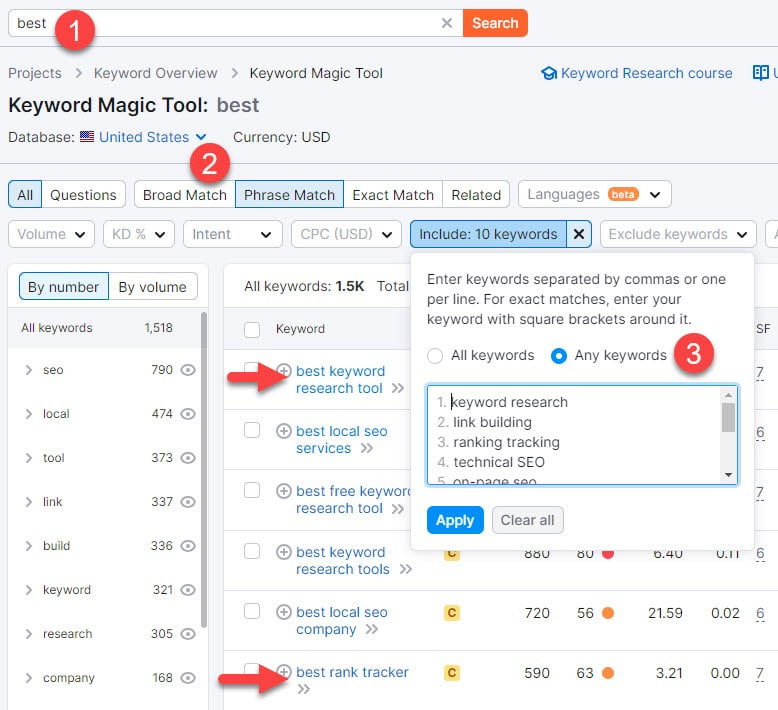
The Keyword Magic Tool is a great way to start keyword research. Enter a broad term related to your topic. The tool then gives many keyword ideas. It shows related words and phrases people use. You get a large list to explore. This helps you find words with good search volume.
Analyzing Keyword Metrics
Look at the numbers behind each keyword. Check search volume to see how many people search it. Low competition means easier to rank for that word. Also, notice the keyword difficulty score. This tells how hard it is to appear in search results. Choose keywords with good volume and low difficulty.
Filtering And Grouping Keywords
Use filters to narrow down your list. Filter by search volume, competition, or word length. Group keywords by topic or intent. This helps organize your research. Grouping makes it easier to create focused content. You can target several keywords in one article this way.
Competitor Keyword Analysis
Competitor keyword analysis helps you find the right keywords for your site. It shows what words your competitors use to get visitors. This way, you can pick good keywords to improve your content and rank higher in search results.
Using Semrush for this task saves time and gives clear insights. It helps you see what works for others and find gaps you can fill.
Identifying Competitor Keywords
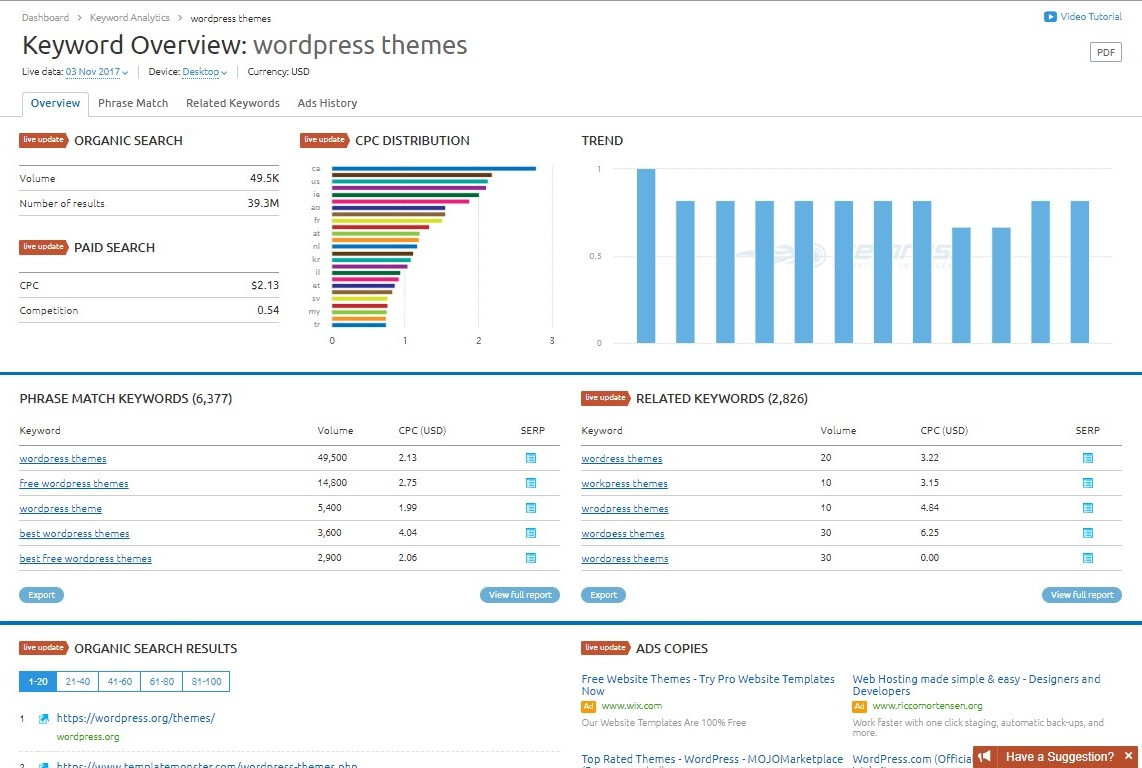
Start by entering a competitor’s website into Semrush’s Keyword Overview tool. The tool lists keywords that bring traffic to that site. You get a list of keywords your competitor ranks for in search engines.
Focus on keywords with high volume but low competition. These keywords can bring easy traffic. Also, check for keywords related to your niche and content.
Semrush shows paid and organic keywords. Use organic keywords to improve your free search rankings.
Comparing Keyword Performance
Semrush lets you compare your keywords with your competitors’. Use the Keyword Gap tool to see which keywords overlap. Find keywords your competitors rank for but you don’t.
Check metrics like search volume, keyword difficulty, and traffic potential. These numbers help you pick strong keywords to target.
Compare keyword trends over time. It shows if a keyword is gaining or losing popularity. Pick keywords that grow in interest to stay ahead.
Tracking Keyword Rankings
Tracking keyword rankings helps you know how well your website performs in search engines. It shows which keywords bring traffic and which need work. Semrush offers tools to track rankings over time. This helps you adjust your SEO plan for better results.
Setting Up Position Tracking
Start by adding your website to Semrush’s Position Tracking tool. Enter the keywords you want to track. Choose the location where your audience is. This can be a country, city, or even a specific device. Semrush will collect ranking data daily. You can also add competitors to compare your rankings with theirs.
Check the settings to match your goals. Decide on the search engine, device type, and language. These details help get accurate ranking reports. Save the project to start monitoring your keyword positions automatically.
Interpreting Ranking Data
Semrush shows your keyword rankings in easy-to-read charts and tables. Look at the position changes for each keyword. Rising ranks mean your SEO efforts work. Falling ranks show where you must improve. The tool highlights keywords that appear in the top 3, top 10, or lower.
Use this data to find strong and weak spots. Check your competitors’ rankings too. This helps you spot new keyword opportunities. Watch for trends over weeks or months. Consistent tracking ensures your SEO stays on track.
Advanced Keyword Strategies
Advanced keyword strategies help you find the best search terms. These strategies dig deeper into what your audience types. They guide content that matches user intent closely. Using Semrush, you can explore beyond basic keywords. This makes your SEO efforts more effective. Here are three ways to use Semrush for advanced keyword research.
Finding Long-tail Keywords
Long-tail keywords are longer and more specific phrases. They have less competition and attract targeted visitors. Use Semrush’s Keyword Magic Tool to find these phrases. Enter a broad keyword and filter by phrase length. Focus on terms with lower difficulty scores but good volume. These keywords bring visitors who want exactly what you offer.
Using Keyword Gap Tool
The Keyword Gap Tool compares your keywords with competitors’. It shows terms your competitors rank for but you don’t. Enter your site and up to four competitors. Analyze the missing keywords and add relevant ones to your list. This helps you find new content ideas. It also reveals opportunities to improve your rankings.
Leveraging Local Seo Keywords
Local SEO keywords target users in a specific area. Semrush helps find location-based search terms. Use the Keyword Overview and filter by location. Look for keywords with local intent like city names or neighborhoods. Add these to your content to attract nearby customers. Local keywords boost your visibility in local search results.

Credit: www.semrush.com
Integrating Semrush Data Into Content
Integrating Semrush data into your content helps improve its visibility in search engines. It guides you to choose the right keywords and use them smartly. This process makes your content more relevant to your audience and easier to find.
By applying Semrush insights, you can tailor your writing to match what users search for. This increases the chances that your page will rank higher and attract more visitors. Let’s explore how to apply this data effectively.
Optimizing Content With Keywords
Start by selecting keywords from Semrush that fit your topic. Use these words naturally in titles, headings, and paragraphs. Avoid stuffing keywords; keep the flow smooth and clear.
Focus on primary and related keywords. This helps cover different search queries. Place keywords in the first 100 words to catch attention early. Also, include them in meta descriptions for better click rates.
Check the keyword density using Semrush tools. Aim for a balance that feels natural. Use synonyms and variations to keep content fresh and diverse.
Using Semrush Seo Writing Assistant
The Semrush SEO Writing Assistant gives real-time feedback on your content. It checks readability, keyword use, and tone. Follow its suggestions to improve your text step by step.
This tool also compares your content with top-ranking pages. It shows how you can match or exceed their quality. Adjust your writing based on its advice to boost SEO performance.
Use the assistant to maintain keyword focus without overuse. It helps keep your content user-friendly and search-engine friendly at the same time.
Avoiding Common Keyword Research Mistakes
Keyword research can be tricky. Many make simple mistakes that waste time and effort. Using Semrush smartly helps avoid these errors. Focus on key points to get better results. This section covers two common mistakes to watch out for.
Overlooking Search Intent
Search intent means the reason behind a user’s search. People want different things: answers, products, or ideas. Semrush shows user intent for each keyword. Ignoring this can lead to wrong content and low traffic.
Check if the keyword fits your content goal. Match what users want with your page purpose. This makes your site useful and improves rankings.
Ignoring Keyword Difficulty
Keyword difficulty tells how hard it is to rank. Semrush gives a score from easy to tough. Skipping this step wastes effort on impossible keywords.
Pick keywords with difficulty you can handle. Mix easy and medium keywords for quick wins. This helps your site grow steadily and gain authority.
Credit: www.attaliescazu.com
Credit: www.honeybook.com
Frequently Asked Questions
What Is Semrush Keyword Research Tool?
Semrush keyword research tool helps find relevant keywords for SEO. It provides search volume, competition, and trends. It aids in identifying high-potential keywords to improve website rankings and traffic. Users can analyze competitors’ keywords and discover new content ideas.
How To Find Keywords With Semrush?
To find keywords, enter a seed word in Semrush's Keyword Overview. Review keyword suggestions, search volume, and difficulty scores. Use filters to narrow results by location or language. Export the list for SEO strategy planning and content creation.
Can Semrush Analyze Competitor Keywords?
Yes, Semrush allows you to analyze competitor keywords. Enter a competitor’s domain to see their top-ranking keywords. This helps identify gaps and opportunities. Use this data to improve your SEO and outrank competitors effectively.
How To Use Semrush For Long-tail Keywords?
Use Semrush’s Keyword Magic Tool to find long-tail keywords. Filter by phrase match or questions to get specific keyword ideas. Long-tail keywords have lower competition and higher conversion potential. They help attract targeted traffic to your site.
Conclusion
Semrush makes keyword research simple and effective. You can find the right keywords fast. The tool helps you check competitors’ keywords too. Use filters to focus on what matters most. Track keyword trends to stay ahead. Consistent research improves your website’s traffic.
Try different keywords to see what works best. Keep your content fresh and relevant. Semrush supports your SEO goals step by step. Start using it today for better results.